
Rajesh’s Problem
Rajesh had been using Business Central for months. Billing smooth. Stock updates smooth. Sales reports smooth. But checking product information was frustrating.
He called Rohan, “Rohan, every time I want to check a product, I must open:
- Item Card
- Ledger Entries
- Vendor Card
Why can’t I see everything in ONE screen?
I want ONE view with:
- Product
- Stock
- Total sold
- Supplier name
- Supplier phone
And highlight low stock in red!”
Rohan replied, “The data exists. But it is scattered. We need a Query Object.”
The Query Object (with Syntax Explanation)
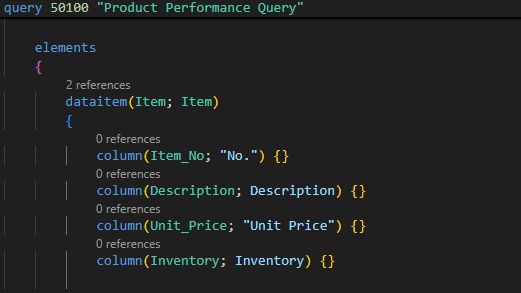
query 50100 "Product Performance Query"
{
QueryType = Normal;
Caption = 'Product Performance Data';
elements
{
    dataitem(Item; Item)
    {
        column(Item_No; "No.") {}
        column(Description; Description) {}
        column(Unit_Price; "Unit Price") {}
        column(Inventory; Inventory) {}

        dataitem(ItemLedger; "Item Ledger Entry")
        {
            DataItemLink = "Item No." = Item."No.";
            SqlJoinType = LeftOuterJoin;

            column(Total_Sold; Quantity)
            {
                Method = Sum;
            }
        }

        dataitem(Vendor; Vendor)
        {
            DataItemLink = "No." = Item."Vendor No.";
            SqlJoinType = LeftOuterJoin;

            column(Vendor_Name; Name) {}
            column(Vendor_Phone; "Phone No.") {}
        }
    }
}
}
Query Syntax Explanation
query 50100: Defines a Query Object with ID 50100.
QueryType = Normal: Standard query type.
Caption: Display label.
elements: The structure of the query.

dataitem(Item; Item): Base table. First name = alias, second = actual table.
column(): Defines output fields from the table.

dataitem(ItemLedger; "Item Ledger Entry"):
Joins sales history table.

DataItemLink = "Item No." = Item."No.": Join condition.
SqlJoinType = LeftOuterJoin: Includes items even with zero sales.

column(Total_Sold; Quantity) { Method = Sum; }
SUM all sales for each product.

dataitem(Vendor; Vendor):
Links supplier information.
The Page (UI Rajesh Wanted)
page 50101 "Product Performance List"
{
    PageType = List;
    SourceTable = "Product Performance Query";
    Caption = 'Product Performance Dashboard';
    Editable = false;

    layout
    {
        area(Content)
        {
            repeater(Items)
            {
                field(Item_No; Rec.Item_No) {}
                field(Description; Rec.Description) {}
                field(Unit_Price; Rec.Unit_Price) {}

                field(Inventory; Rec.Inventory)
                {
                    Style = Attention;
                    StyleExpr = Rec.Inventory < 10;
                }

                field(Total_Sold; Rec.Total_Sold) {}
                field(Vendor_Name; Rec.Vendor_Name) {}
                field(Vendor_Phone; Rec.Vendor_Phone) {}
            }
        }
    }
}
Page Syntax Explanation
PageType = List: Displays rows in a table-like view.
SourceTable = Query: Uses query output instead of a table.
field(): Displays individual data fields.
StyleExpr: Highlights low stock in red.
Rajesh said, “This is EXACTLY what I wanted!”
Advanced Queries Rajesh Requested
Rajesh later asked, “Now I want analytics — fast sellers, slow sellers, supplier performance.”
Rohan built:
- Fast-moving item query
- Slow-moving item query
- Supplier performance query
- Monthly sales trend query
Rajesh now had full control over:
- Purchasing
- Inventory
- Supplier management
- Sales forecasting
The Final Result
Rajesh said: “Business Central was good… But your Query Extensions made it PERFECT for my business.”
He now enjoys:
- One screen instead of 5
- Faster decisions
- Accurate stock visibility
- Better planning
- Higher profits
- Peace of mind