
Microsoft releases regular updates to Business Central, but do you know what’s coming before it arrives? Instead of being surprised by changes, you can preview and test new features before they roll out to your entire organization. This is where Feature Management comes in.
What Is Feature Management?
Feature Management is a built-in tool provided by Microsoft that allows you to discover, preview, and enable upcoming features before they become mandatory in your Business Central environment. It gives you a complete view of what’s coming in future updates and lets you test these features in a safe environment first.
Feature Management should always be tested in a sandbox or test environment first. Never enable features directly in your production environment without thoroughly testing them.
What You Can Do with Feature Management
The Feature Management tool provides a wide set of capabilities, including:
- Discover Upcoming Features
See a complete list of features coming to Business Central in future updates, along with release dates. - Try Features Before They Go Live
Use the “Try it out” option to temporarily enable features for your session only, allowing you to preview functionality without affecting other users. - Enable Features for All Users
Once tested, enable features for your entire sandbox environment to see how they work with your organization’s data and processes. - Schedule Data Updates
Some features require data changes. You can schedule these updates for a specific time or run them immediately. - Understand Dependencies
Learn which features are automatically enabled when you enable others, preventing unexpected changes. - Preview on Different Scenarios
Test features in your sandbox before deciding whether to enable them in production.
How to Start Using Feature Management
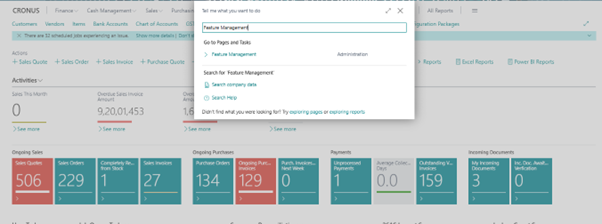
1. Go to Feature Management by searching for it in the search bar.
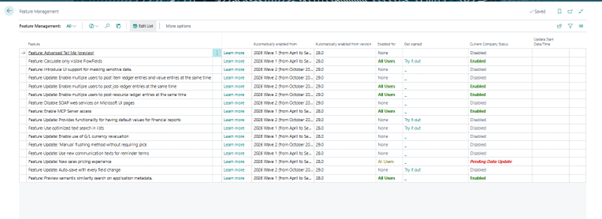
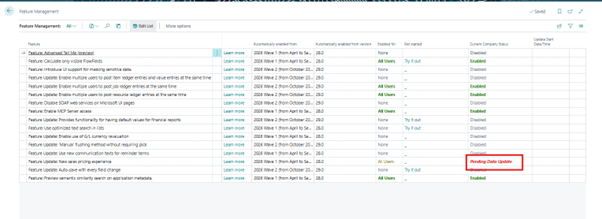
2. You’ll see a list of features with their status.
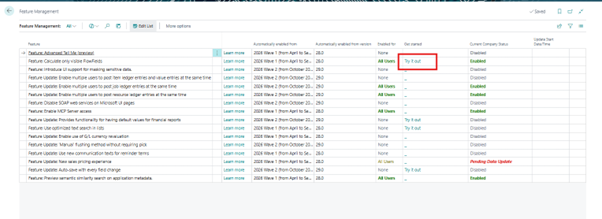
3. To try a feature, click the “Try it out” link for features that offer this option. This temporarily enables the feature for your session only.
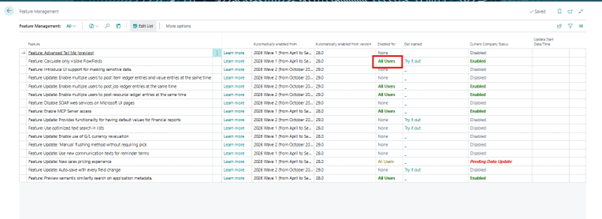
4. To enable a feature for all users, select “All Users” from the “Enabled for” column. This applies to your entire sandbox environment.
5. If a feature requires a data update, you’ll be prompted to schedule or run it immediately.
Best Practices for Using Feature Management
- Always Test in Sandbox — Never enable features directly in production. Use a sandbox or test environment first to ensure compatibility with your customizations.
- Review the “Learn More” Details — Each feature includes a “Learn More” link that explains what’s changing and how it affects your workflows.
- Check for Non-Reversible Features — Some features cannot be disabled once enabled. Feature Management will warn you with a message if this is the case. Read these warnings carefully.
- Watch for Feature Dependencies — Enabling one feature may automatically enable other dependent features. Understand these relationships before testing.
- Document Your Testing — Keep records of which features you’ve tested, what issues you found, and when you plan to enable them in production.
- Plan Around Release Cycles — Microsoft releases major updates in April and October. Plan your testing accordingly.
Why Use Feature Management?
Feature Management empowers administrators and business users to:
- Stay informed about upcoming changes to Business Central.
- Test new functionality in a safe environment before production rollout.
- Avoid disruptions by understanding feature impacts ahead of time.
- Control the timing and scope of feature enablement across your organization.
It bridges the gap between staying current with Microsoft updates and maintaining stability in your production environment by giving you a safe space to experiment before rolling changes live.
Best Practices and Conclusion (Feature Management)
Using Feature Management in Business Central goes beyond just knowing what’s coming. It empowers you to take control of your upgrade timeline and ensure new features work for your unique business needs. But since enabling features affects all users, it’s important to approach this thoughtfully.
When to Use Feature Management
Use Feature Management when you need to:
- Preview new functionality that’s coming to Business Central.
- Test data updates that accompany new features in a safe environment.
- Evaluate feature impact on your workflows before enabling organization-wide.
- Prepare your team with training and documentation on upcoming changes.
- Make informed decisions about when to enable features in production.
Tips for Effective Feature Management
- Always Work in Sandbox First — Feature Management is available in sandbox environments. Test and validate changes here before considering production enablement.
- Read Warning Messages Carefully — Pay special attention to warnings about non-reversible features. You cannot undo these changes once enabled.
- Understand Automatic Enablement Dates — Note when features will be automatically enabled for everyone. Plan your testing before those dates arrive.
- Test with Your Data — Use a sandbox that mirrors your production environment so you can see how features interact with your actual data and customizations.
- Try Before You Commit — Use the “Try it out” option to preview features in your session before enabling them for all users.
- Document Your Decisions — Record which features you’ve tested, your findings, and your rollout plans. This helps with team communication and future reference.
Why Feature Management Matters
- Reduces Risk — Testing in advance prevents unexpected issues from impacting your business.
- Empowers Planning — You control when and how new features roll out, not Microsoft’s release schedule.
- Improves Adoption — Your team has time to learn and prepare for changes before they go live.
- Ensures Compatibility — You can verify that new features work with your customizations and workflows before production deployment.
Conclusion
Feature Management is your window into the future of Business Central. It transforms how you approach updates from reactive (dealing with surprises) to proactive (planning ahead).
When used wisely, Feature Management ensures your organization stays current while maintaining control, stability, and confidence in your Business Central environment.
In short: With Feature Management, you don’t just react to updates you master them.