
1. Introduction
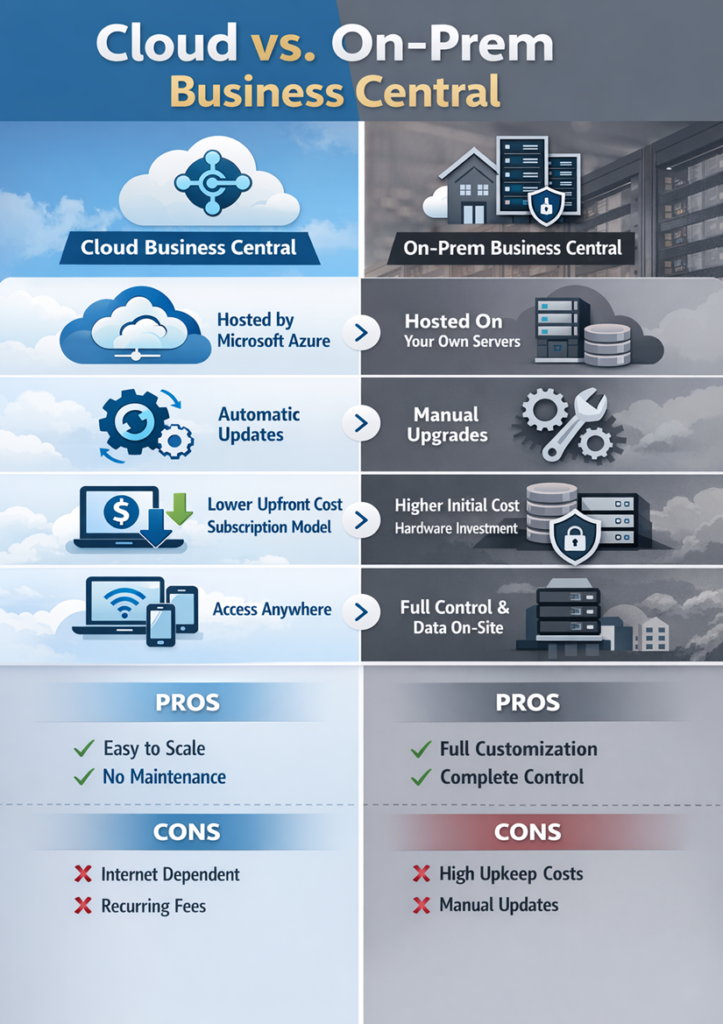
When implementing Microsoft Dynamics 365 Business Central, one of the most important decisions organizations must make is:
Should we deploy Business Central in the Cloud or On-Premise?
Both deployment models offer the same core ERP functionality, but they differ significantly in infrastructure, cost, maintenance, scalability, and control.
This guide explains:
- What Cloud deployment means
- What On-Premise deployment means
- Pros & Cons of each
- A structured comparison
- How to decide which option is right for your organization
2. Understanding the Two Deployment Models
2.1 Cloud (SaaS) Deployment
Cloud Business Central is hosted and managed by Microsoft in Azure data centers.
- No local servers required
- Subscription-based model
- Automatic updates
- Accessible from anywhere
It runs as Software-as-a-Service (SaaS).
2.2 On-Premise Deployment
On-Premise Business Central is installed on your organization’s own servers or private data center.
- Full control over infrastructure
- Manual upgrades
- IT team manages hardware, backups, and security
3. Pros and Cons: Detailed Comparison
3.1 Cloud Business Central: Pros & Cons
Pros of Cloud Deployment
1. Lower Upfront Cost
No need to invest in:
- Servers
- Storage hardware
- IT infrastructure
Only subscription licensing cost.
2. Automatic Updates
Microsoft manages:
- Security patches
- Feature updates
- Performance improvements
No upgrade project required.
3. High Availability
Hosted on Microsoft Azure with:
- Disaster recovery
- Backup
- Redundancy
Minimal downtime risk.
4. Remote Accessibility
Accessible from:
- Any location
- Any device (browser-based)
Ideal for remote teams.
5. Scalability
Easily:
- Add users
- Increase storage
- Expand capacity
No hardware purchase required.
Cons of Cloud Deployment
1. Recurring Subscription Cost
Monthly/yearly payment continues indefinitely.
2. Limited Deep Customization
Some:
- Server-level modifications
- Direct database access are restricted.
3. Internet Dependency
Requires stable internet connection.
3.2 On-Premise Business Central: Pros & Cons
Pros of On-Premise Deployment
1. Full Control
Complete control over:
- Server configuration
- Database access
- Upgrade timing
2. Advanced Customization
Suitable for:
- Heavy customization
- Direct SQL integrations
- Complex legacy integrations
3. Data Residency Control
Data stays within organization’s physical infrastructure.
Preferred in highly regulated industries.
Cons of On-Premise Deployment
1. High Initial Investment
Requires:
- Server purchase
- IT infrastructure setup
- Implementation cost
2. Manual Upgrades
Upgrade projects require:
- Testing
- Downtime planning
- Cost & technical effort
3. IT Maintenance Responsibility
Organization must manage:
- Backups
- Security
- Performance
- Disaster recovery
4. Side-by-Side Comparison Table
| Feature | Cloud | On-Premise |
| Hosting | Microsoft Azure | Local Server |
| Upgrades | Automatic | Manual |
| Initial Cost | Low | High |
| Maintenance | Microsoft Managed | Customer Managed |
| Accessibility | Anywhere | Network-based |
| Customization | Moderate | High |
| Infrastructure | Not required | Required |
| Disaster Recovery | Included | Must be configured |
5. Which One Should You Choose?
Now let’s break this down step-by-step.
Step 1: Evaluate IT Capability
If your company:
- Has small IT team
- Wants minimal infrastructure management
Choose Cloud
If your company:
- Has strong IT department
- Requires server-level control
Consider On-Premise
Step 2: Budget Consideration
If you prefer:
- Lower upfront cost
- Predictable monthly billing
Cloud is ideal
If you prefer:
- One-time infrastructure investment
- Long-term internal control
On-Premise may fit
Step 3: Compliance & Data Requirements
If your industry requires:
- Strict data control
- Physical server management
On-Premise may be required
Otherwise:
Cloud is secure and compliant in most industries
Step 4: Growth & Scalability
If your company:
- Plans rapid expansion
- Operates in multiple locations
Cloud is highly scalable
6. Recommended Choice (Modern Trend)
Today, most new implementations choose:
Cloud (SaaS)
Because:
- Faster deployment
- Lower IT burden
- Automatic upgrades
- Better integration with Microsoft ecosystem
On-Premise is usually chosen only when:
- Legacy systems require deep integration
- Strict regulatory control is mandatory
- Organization has heavy customizations
7. Final Conclusion
Both deployment models of Microsoft Dynamics 365 Business Central provide the same ERP capabilities.
The key difference lies in:
- Infrastructure ownership
- Upgrade management
- Cost structure
- IT involvement
Cloud = Flexibility, scalability, minimal maintenance
On-Premise = Control, customization, infrastructure ownership
The right choice depends on your organization’s size, IT maturity, compliance needs, and long-term digital strategy.