Introduction
Microsoft Dynamics 365 Business Central continues to evolve through the regular introduction of new features and intelligent agents aimed at improving business productivity and usability. However, due to operational workloads and time constraints, users may not always explore or adopt these new capabilities in a timely manner.
This document focuses on one of the recently introduced Microsoft agents in Business Central. Specifically, the feature provides an automated mechanism for analysing sales order data by summarizing order values and presenting the complete order information in a consolidated summary report. The agent is designed to deliver quick insights, enhance decision‑making, and reduce the manual effort involved in reviewing detailed order records.
What Is the Summary Feature?
The Summary feature in Microsoft Dynamics 365 Business Central automatically generates a concise overview of the data displayed on a specific page. This functionality enables users to quickly interpret key information and trends without the need to review each individual record in detail.
By presenting aggregated insights in a summarized format, the feature improves efficiency and supports faster decision‑making. The Summary feature leverages artificial intelligence capabilities that are integrated into Business Central, ensuring that the generated content is context‑aware and relevant to the underlying business data.
Where Is the Summary Feature Used?
The Summary feature is available across multiple transactional and master data pages within Microsoft Dynamics 365 Business Central to provide concise, AI‑generated insights. The feature is commonly used in the following areas:
- Sales Documents: From Sales Orders through to Posted Sales Invoices, where it provides a summarized overview of order values, quantities, and key transactional details.
- Purchase Documents: From Purchase Orders through to Posted Purchase Invoices, enabling users to quickly review summarized purchasing information and financial impact.
- Customer Card: To present a high‑level summary of customer‑related data, including transaction history and overall engagement.
- Vendor Card: To deliver a consolidated overview of vendor information, supporting efficient analysis of supplier interactions and transactions.
Benefits of the Summary Feature
The Summary feature in Microsoft Dynamics 365 Business Central delivers several operational and strategic benefits by leveraging AI‑driven insights:
- Faster Data Analysis: The feature enables rapid interpretation of transactional and master data by presenting condensed, meaningful summaries, reducing the time required for analysis.
- Improved Decision‑Making: By providing clear and contextual insights immediately, the Summary feature supports more informed and timely business decisions.
- Reduced Manual Effort: Automated summarization minimizes the need for users to manually review and consolidate individual records, lowering operational overhead.
- Increased Productivity: By streamlining data review and eliminating repetitive analysis tasks, the feature allows users to focus on higher‑value activities, thereby enhancing overall productivity.
Demonstration Through Screenshot
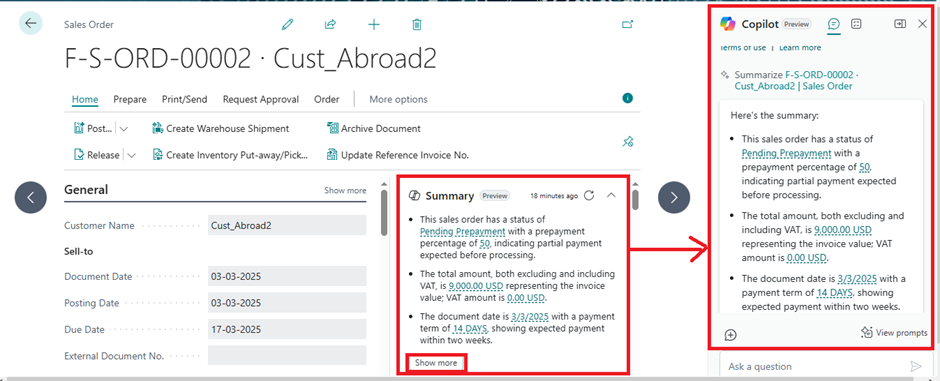
The following demonstration illustrates the usage of the Summary feature using a Sales Order as an example.
Within the Sales Order list page, the Summary option is displayed as a fixed element. When the Show More option is selected, the integrated Copilot agent is activated. This agent generates and presents detailed, AI‑driven insights related to the selected sales order, including summarized order values and key transactional information.