
Rajesh’s Next Challenge: Making Data User-Friendly
After digitizing his data using tables and table extensions, Rajesh Mehta — owner of Mehta Gifts & Stationery — noticed another gap.
While all customer data was now stored neatly in Business Central, navigating it wasn’t simple. Rajesh still had to open multiple lists and search menus to find customer feedback or loyalty information.
He turned again to Rohan, his trusted Business Central AL developer, to make his system not just data-driven — but also user-friendly and visual.
1. Pages in Business Central — Your Digital Storefront for Data
Rohan explained that in Business Central, a Page is like a digital storefront.
Tables are like the stockroom — where data is stored.
Pages are like the shelves — where you display the right items neatly for customers (or users) to interact with.
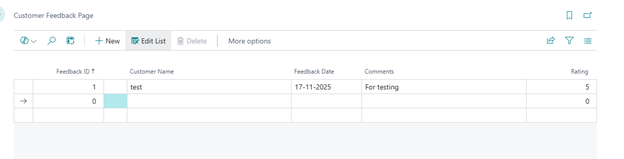
To help Rajesh quickly view customer feedback, Rohan created a Customer Feedback Page using AL code.
page 50100 "Customer Feedback Page"
{
PageType = List;
SourceTable = "Customer Feedback";
ApplicationArea = All;
UsageCategory = Lists;
layout
{
    area(content)
    {
        repeater(Group)
        {
            field("Feedback ID"; "Feedback ID") { ApplicationArea = All; }
            field("Customer Name"; "Customer Name") { ApplicationArea = All; }
            field("Feedback Date"; "Feedback Date") { ApplicationArea = All; }
            field("Comments"; Comments) { ApplicationArea = All; }
            field("Rating"; Rating) { ApplicationArea = All; }
        }
    }
}

actions
{
    area(processing)
    {
        action(ViewDetails)
        {
            Caption = 'View Details';
            ApplicationArea = All;
            trigger OnAction()
            begin
                Message('Viewing feedback for: %1', "Customer Name");
            end;
        }
    }
}
}
This page gave Rajesh a real-time feedback dashboard, allowing him to sort and filter customer comments instantly.
Instead of flipping through notebooks, he could now see insights in seconds.
2. Page Extensions — Enhancing Existing Pages Safely
As Rajesh explored his new setup, he asked:
“Can I see each customer’s loyalty points right on their profile?”
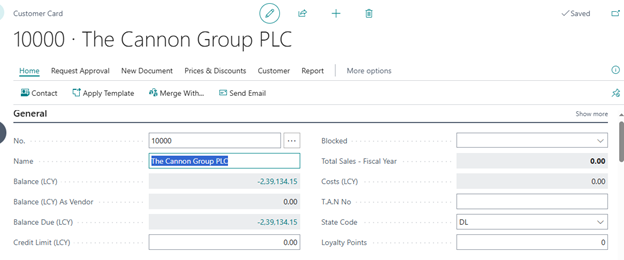
Instead of building a new page, Rohan decided to extend the existing Customer Card page — the one Rajesh already used daily.
This is where Page Extensions come in.
They allow developers to add fields, actions, or layouts to standard Business Central pages without touching the base code — keeping the system stable and upgrade-safe.
Here’s how Rohan added the Loyalty Points field to Rajesh’s Customer Card:
pageextension 50101 CustomerCardExtension extends "Customer Card"
{
layout
{
addlast(General)
{
field("Loyalty Points"; "Loyalty Points")
{
ApplicationArea = All;
Caption = 'Loyalty Points';
ToolTip = 'Displays total loyalty points for this customer.';
}
}
}
actions
{
    addlast(processing)
    {
        action(ResetLoyalty)
        {
            Caption = 'Reset Loyalty Points';
            ApplicationArea = All;
            trigger OnAction()
            begin
                "Loyalty Points" := 0;
                Modify(true);
                Message('Loyalty points have been reset for %1.', Name);
            end;
        }
    }
}
}
3. The Power of Visual Transformation
Here’s how Rohan’s use of Pages and Page Extensions transformed daily work:
| Before | After |
| Feedback stored in tables only | Dedicated Feedback Page |
| Loyalty points managed separately | Shown directly in Customer Card |
| Manual lookups | Instant, visual access |
| Cumbersome workflows | Simple, guided user interface |
Now Rajesh’s team could spend less time searching and more time serving customers.
4. Beginner Tips from Rohan
- Start with existing pages — You can always extend them instead of rebuilding from scratch.
- Use ApplicationArea = All to make your pages accessible everywhere.
- Keep your layout organized with groups and repeaters.
- Use actions wisely — only add those that improve user productivity.
- Always test your extensions after publishing to make sure the UI flows naturally.
The Result: A Digital System That Works Like Rajesh Thinks
Thanks to Pages and Page Extensions, Rajesh now interacts with Business Central as if it were built just for him.
He can instantly review customer feedback, manage loyalty points, and make informed business decisions — all from one place.
And for Rohan, it was another successful AL customization project — transforming code into real-world value.
Next in the Series → Business Central Report Layouts – From Concept to Production Code