Introduction
Microsoft Dynamics 365 Business Central has introduced a new enhancement in the 2026 Wave 1 (version 28) release titled Calculate Only Visible FlowFields. This feature addresses a long-standing performance limitation associated with FlowField evaluation on pages and represents a substantial advancement in optimizing data rendering. By calculating only those FlowFields that are visible to the user at runtime, the platform minimizes redundant database queries, improves page responsiveness, and increases overall system scalability—particularly in environments characterized by large data volumes.
How it contributes to improved usability and performance for Business Central users
- Reduces database load by calculating only FlowFields that are visible on the page.
- Improves page load times by avoiding unnecessary FlowField evaluations.
- Enhances list page performance when working with large datasets.
- Prevents hidden or personalized columns from triggering background calculations.
- Improves system scalability in multi‑user and SaaS environments.
- Ensures more predictable and consistent page responsiveness.
- Allows cleaner role‑based UI designs without performance penalties.
- Reduces service tier and SQL resource consumption.
- Improves user experience through faster navigation and filtering.
- Aligns runtime processing strictly with user‑visible data requirements.
Step-by-step visuals illustrating how the feature works
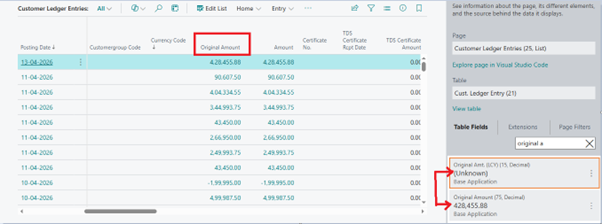
1. The two fields referenced below are FlowFields sourced from the Customer Ledger Entries table. The Original Amount field is visible on the page, whereas the Original Amount (LCY) field is not visible.

2. In the visual shown below, the Original Amount FlowField is visible on the user interface, whereas the Original Amt. (LCY) FlowField is not displayed because it has not been calculated due to its non-visibility on the page.